
English
DevTools
@hazejs/devtools adds DevTools to the dev server: panels that show how the app is put together and what it does at runtime, an MCP endpoint that gives coding agents the same view, and a static report of the app's structure. It is built on devframe and is experimental: the panels and options may change between minor versions.
| Panel | What it shows |
|---|---|
| Overview | App name, mode, directories, Node.js version, route count, the result of the last (re)load, enabled modules and sub-apps. |
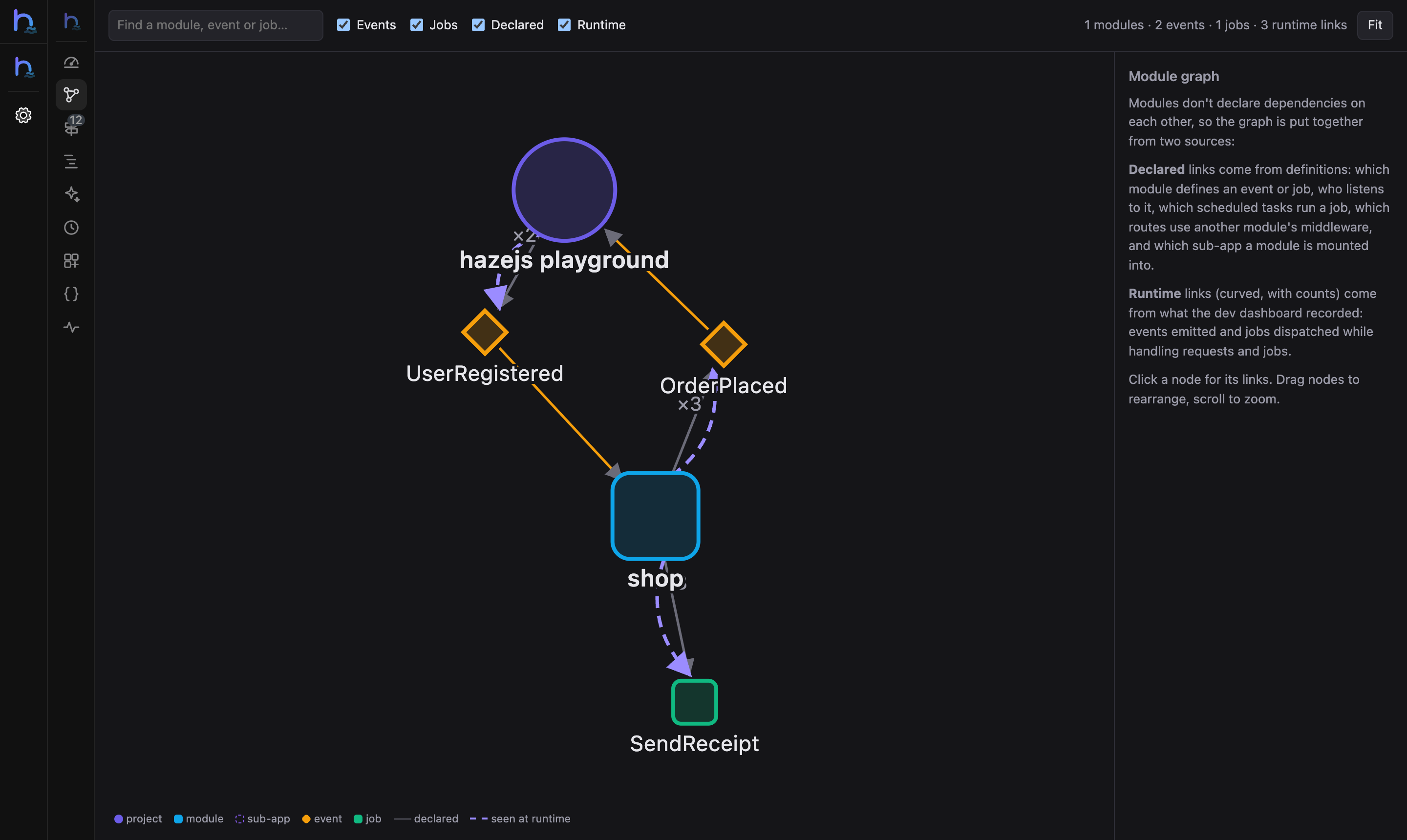
| Graph | How modules link to each other through events, listeners, jobs, scheduled tasks, shared middleware and sub-app mounts, plus the events and jobs actually seen at runtime. |
| Routes | Every route with its method, path, name, handler, middleware, module and app. Type to filter. |
| Requests | Recent requests and a waterfall of what each one did: queries, cache calls, events, jobs (including the queued work it caused), mail, logs, exceptions, AI and outgoing HTTP calls. Repeated queries are flagged as possible N+1. |
| AI | Calls, tokens and latency per model; the messages, output and tool calls of each call; a playground that runs a prompt against the app's models. |
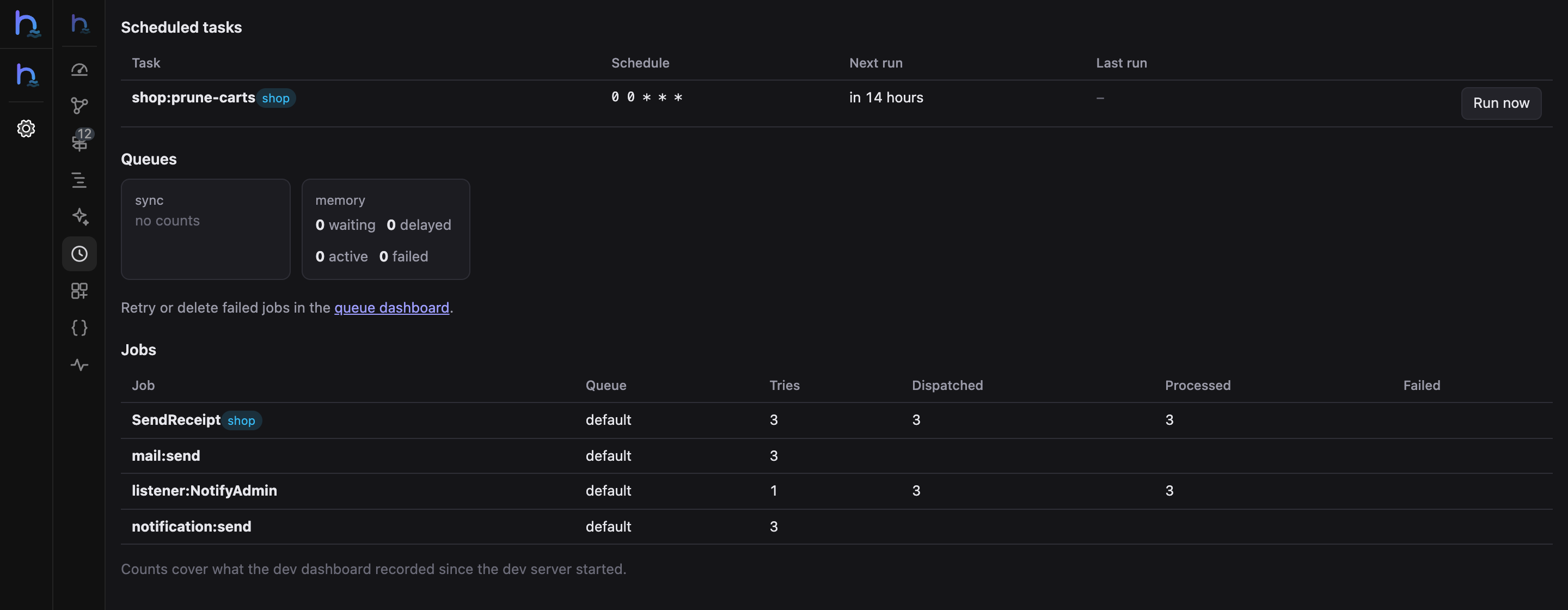
| Tasks | Scheduled tasks with their next and last run and a Run now button; queue counts; dispatch, success and failure counts per job. |
| Internals | Global middleware, middleware aliases and groups, providers, container bindings, events and their listeners, queue jobs, each with the module it comes from. |
| API Docs | The app's OpenAPI page (/docs), when it is on. |
| Dashboard | The dev dashboard at /__haze, when it is on. |
| Terminals | Shells in the browser, plus one-click haze route:list, module:list, schedule:list and queue:work. |
Installation
bash
pnpm add -D @hazejs/devtoolsThat's all. haze dev finds the package and prints its URL:
  ➜  Local:    http://localhost:3000/
  ➜  Routes:   12
  ➜  DevTools: http://localhost:3000/__devtools/
In full-stack projects the haze() Vite plugin mounts DevTools on the Vite server and injects a floating dock into your frontend pages. If the Vite config turns on Vite DevTools, the hazejs panels appear there instead.
DevTools runs in the dev server process, not inside your app. When you edit a file, the app reloads and the panels update in place: the browser stays connected and keeps its state. If a reload fails, the Overview panel shows the error and a notification appears; both clear once the app loads again.
Production builds never include DevTools: only the dev server loads it, and haze build output has no reference to it.
The module graph
hazejs modules don't declare dependencies on each other: they talk through events, jobs and shared middleware. The Graph panel puts those links together from two sources.
Declared links come from definitions:
- a module (or the project) defines an event or a job;
- an event is listened by a module's listener (queued listeners are marked);
- a scheduled task schedules a job;
- a route uses middleware of another module, through an alias that module registered;
- a module is mounted into a sub-app.
Runtime links come from what the dev dashboard recorded: the events a module's requests emitted and the jobs they dispatched, with counts. Events emitted while a job runs are attributed to that job. Runtime links are drawn as curved, animated lines.
Click a node to list its links in and out. Drag nodes to rearrange them and scroll to zoom.
Requests
The Requests panel lists the requests the dev server handled, newest first, with their status, duration, route and module. Select one to see its timeline: every operation is placed at the moment it started, relative to the request. Work done by a queued job that the request dispatched is included and marked job.
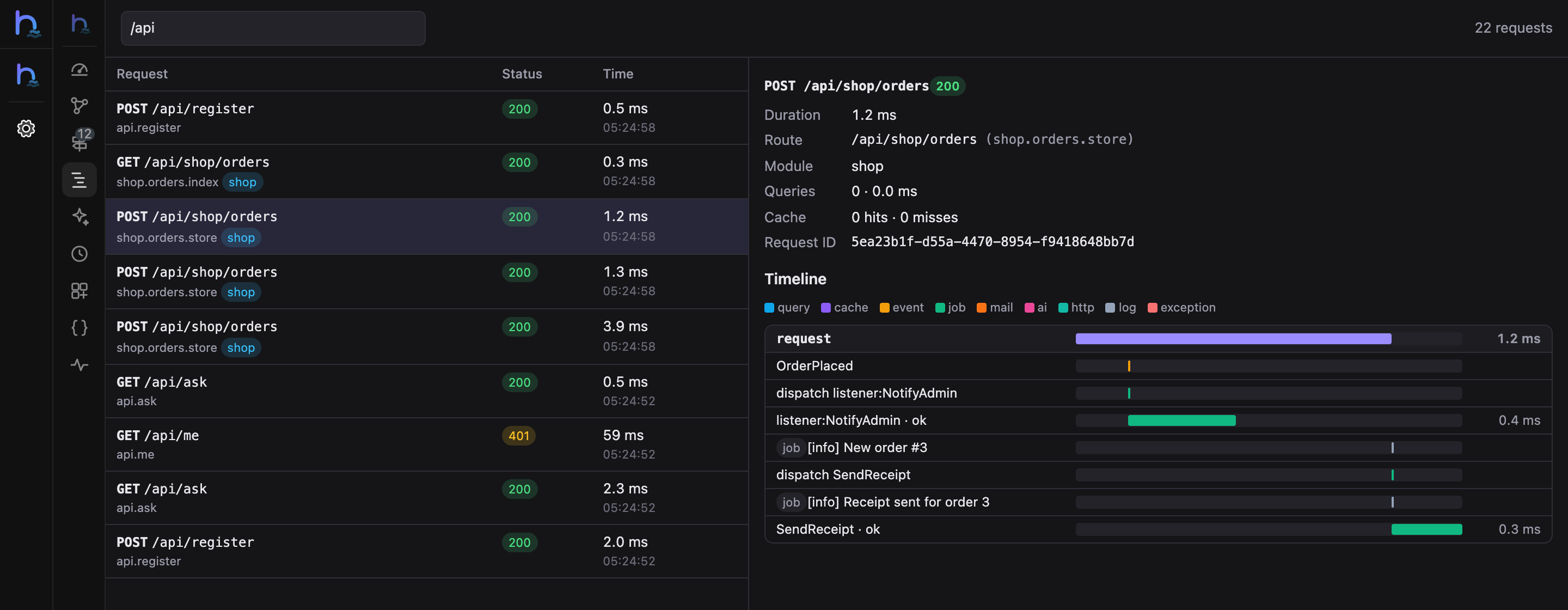
When the same SQL runs two or more times in a request, the panel lists it under Repeated queries and marks each occurrence N+1.
The panel reads the dev dashboard's records, so the dashboard must be on (the default in development).
AI
The AI panel lists the model calls made through @hazejs/ai: totals and averages per model, and for each call the messages it sent, the output and the tool calls the model made. Messages and outputs are recorded only while the dev dashboard is on, and each part is cut at 4,000 characters. OpenTelemetry and other telemetry consumers never receive them.
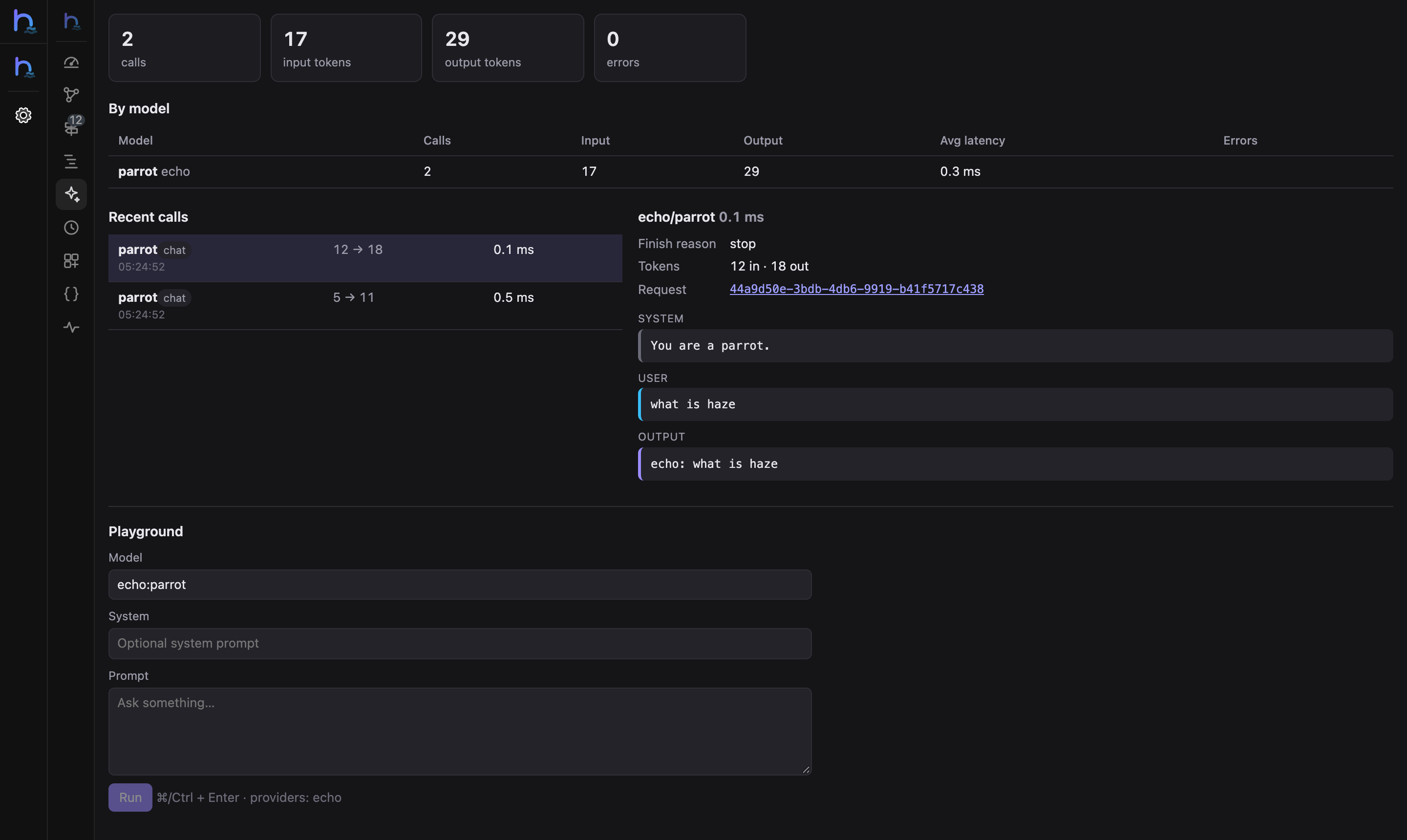
The playground runs a prompt against any configured model or alias, with an optional system prompt. Its calls show up in the list like any other.
Tasks
The Tasks panel lists scheduled tasks with their cron expression, time zone, next run and last run. Run now runs a task immediately, with the same withoutOverlapping and onOneServer checks as the scheduler, and records the run. Queue counts come from each connection's driver; retry or delete failed jobs in the queue dashboard.
Coding agents (MCP)
DevTools serves an MCP endpoint at /__devtools/__mcp so a coding agent can look at the running app the same way the panels do:
| Tool | Purpose |
|---|---|
hazejs_snapshot | Modules and what each contributes, sub-apps, routes, middleware, providers, bindings, events, jobs, scheduled tasks. |
hazejs_routes | Search routes by method, path, name, handler, middleware, module or app. |
hazejs_graph | The module graph, with runtime counts. |
hazejs_requests | Recent requests with counts and repeated-query flags. |
hazejs_request | Everything one request did, in order. |
hazejs_ai | Recent AI calls with their messages and output. |
hazejs_openapi | The app's OpenAPI document. |
hazejs_run-schedule | Run a scheduled task now. |
The endpoint accepts only local connections, and clients must send a local Origin header (protection against DNS rebinding). For Claude Code:
bash
claude mcp add --transport http hazejs http://localhost:3000/__devtools/__mcp --header "Origin: http://localhost:3000"Set mcp: false to turn the endpoint off.
Static report
haze devtools:report writes the app's structure (Overview, Graph, Routes and Internals) to a static site you can archive in CI or share in a review. It has no runtime data.
bash
haze devtools:report                    # → .haze/devtools-report
haze devtools:report -o dist/report --base /report/
npx serve .haze/devtools-report
Serve the directory with any static file server; opening index.html from disk doesn't work.
Vite DevTools
In a full-stack project whose vite.config.ts turns on Vite DevTools (devtools: true, with @vitejs/devtools installed), the haze() plugin registers the hazejs panels there instead of serving its own: one UI, one authorization and one MCP endpoint, next to the Vite and framework panels. Both are served at /__devtools/, so hazejs doesn't start a second one.
Authorization
The panels can read your project and run commands in a terminal, so DevTools only accepts browsers you authorize. The first time a browser connects, the terminal prints a one-time code and a link:
╭ hazejs DevTools ─────────────────────────────────────────╮
│ auth code   283377                                       │
│ or open     http://localhost:3000/__devtools/#devframe_otp=283377 │
╰──────────────────────────────────────────────────────────╯
Enter the code on the DevTools page, or open the link. The browser then stays authorized for this project, including after the dev server restarts. In full-stack projects, authorize once on /__devtools/ and the floating dock on the same origin is authorized too.
Configuration
Set devtools in haze.config.ts. In full-stack projects you can also pass it to haze(); the plugin option takes precedence.
ts
// haze.config.ts
import { defineHazeConfig } from '@hazejs/vite'

export default defineHazeConfig({
  devtools: {
    base: '/__devtools/', // mount path
    auth: true, // one-time code on first connect
    terminals: true, // the Terminals panel
    embedded: true, // full-stack: floating dock in the frontend
    mcp: true, // MCP endpoint for coding agents
  },
})| Option | Default | Description |
|---|---|---|
base | '/__devtools/' | Where DevTools is served. |
auth | true | Ask new browsers for the one-time code. Turn it off only when you are the only user of the machine and the dev server listens on localhost. |
terminals | true | Show the Terminals panel. |
embedded | true | Full-stack projects: inject the floating dock into HTML pages served by Vite. |
mcp | true | Serve the MCP endpoint. |
Set devtools: false to turn DevTools off without uninstalling the package.
Programmatic use
The panels read app.introspect(), a serializable snapshot of the application that is also available to your own tools:
ts
const info = app.introspect()
info.modules // [{ name, prefix, routes, providers, jobs, schedules, events, listeners, middleware, … }]
info.events // [{ name, module, listeners: [{ name, module, queued }] }]
info.bindings // [{ key, scope, kind, resolved }]
info.schedules // [{ name, module, expression, nextRun, … }]
@hazejs/devtools exports the building blocks:
ts
import { buildGraph, buildReport, createDevtools, setupViteDevtools } from '@hazejs/devtools'

// DevTools for any object that exposes the app, reload events and the app's module loader (AppHost)
const devtools = createDevtools({ source: host, root })
// devtools.handler(request), devtools.nodeMiddleware, devtools.attach(server)

await buildReport({ source: host, outDir: 'report' })
const graph = buildGraph(app.introspect())